Documentation
Everything about BagIdea Office — what it is, every feature, how to install, and the full CLI.
Introduction
BagIdea Office is a living AI-agent office that runs as your desktop wallpaper. Every AI agent on your machine becomes a pixel-art employee in an HD-2D office: they walk to their desks when real work starts, gather at Security to ask permission, hold meetings, learn skills, and the lights follow your real local time.
It is not a dashboard and not a chat window — it is a world that renders the true state of your Claude Code sessions, headless agent runs and custom scripts as living characters, behind your desktop icons.
Three independent layers keep it robust: a zero-dependency Node daemon (the source of truth), a Godot 4 renderer (the wallpaper), and a lightweight overlay UI (chat, settings, approvals). The daemon keeps agents running even if rendering restarts.

📚 Full guides — how to use every feature
This page is the overview. For step-by-step how-to on every feature — hiring agents, projects, channels, web automation, voice, plugins, models and more — open the full guides (they render on GitHub):
What it is
At its heart, BagIdea Office is an operations layer for AI agents — given a place. Instead of a flat list of tasks, you get a spatial, honest view of what your agents are actually doing:
- Real Claude Code sessions, spawned with each agent's persona, skills and allowed tools.
- A CEO → Director → team chain of command you drive by giving orders.
- Spatialized permission approvals — agents walk to Security for tools you haven't granted.
- Real project folders, resumable sessions, and self-splitting sub-agents for parallel work.
Not just agents. An ecosystem.
BagIdea Office began as a place to have AI agents as real coworkers. It has been growing into something wider: an environment where agents learn, adapt, work together — and grow their own capabilities.
- A team, not a model — One office holds many agents with different roles, skills, tools — and even different brains. They coordinate, hand work off, split into ghost clones for parallel work, hold meetings and report back up the chain. You don't have an AI; you have a team of AI that works together.
- Knowledge that compounds — Agents accumulate knowledge from the work itself — shared office notes, per-agent memory written automatically after real work, workflows saved as reusable skills, and an archive any agent can search. One project creates knowledge the next project can use, so the office doesn't start from zero every time.
- It extends itself — When an agent finds that the capabilities it has aren't enough for the job, it doesn't have to stop — it can propose a tool or a plugin, and with your approval that capability becomes a real part of the running office. The idea shifts from AI that uses tools to AI that can propose new tools and capabilities for itself.
- You are still the CEO — Self-extending doesn't mean unsupervised. Every widening passes a human gate — the Security Center, project-hook trust, and ✅ / ✕ on every proposal, with your reasons. That's also how the team learns what you want next time. The office grows in the direction you keep approving.
Goal → Think → Act → Learn → Extend → Collaborate → RepeatCore concepts
You are the CEO
The gold seat is you. Type an order and the Director (the main Claude agent) walks over, takes it, plans, and delegates to the team.
The Director
main is Claude itself — the office manager who answers you, creates projects, and routes work with DELEGATE lines.
Ghosts (sub-agents)
When a job parallelizes, an agent splits into translucent clones that work on the Ghost Deck and merge back with a synthesis.
The room grid
The floor is a 3×3 jigsaw of identical rooms; any room fits any slot, so you can rearrange the whole office in the editor.
Installation
Windows — one-shot installer (recommended)
Open PowerShell and run the command below — this is the recommended, most reliable path. It installs the dependencies (Git, Node LTS, Godot 4.6.3, Claude Code CLI) and downloads a prebuilt app, so a normal install needs no Visual Studio C++ Build Tools or Rust (those are only a source-build fallback). It clones the app to %LOCALAPPDATA%\BagIdeaOffice, brands the window icon, adds bagidea to your PATH, and creates a Start Menu shortcut. Safe to re-run — each step skips what's already done. No winget? It still works (Git and Node download directly).
irm https://raw.githubusercontent.com/bagidea/bagidea-office/main/installer/install.ps1 | iexmacOS — one-shot installer (beta)
Open Terminal and run the command below. It installs the dependencies (Git, Node, Rust, Godot, Claude Code CLI), clones the app to ~/BagIdeaOffice, builds the desktop shell and the wallpaper-embed shim, wires the Claude hooks, and sets up the bagidea command. Safe to re-run.
curl -fsSL https://raw.githubusercontent.com/bagidea/bagidea-office/main/installer/install-mac.sh | bashLinux — one-shot installer (experimental 🧪)
Ubuntu/Debian (apt) for now. Open a terminal and run the command below. It installs the dependencies (Node 20, Rust, Git, WebKitGTK, GTK, wmctrl/xdotool, PulseAudio utils, Godot 4.6.3), builds the desktop shell, wires the Claude hooks, symlinks bagidea into ~/.local/bin, and adds an XDG autostart entry. On X11/Xorg the office attaches as the real desktop wallpaper; on Wayland it falls back to a fullscreen window pinned below everything. Please report problems with your distro, desktop, and the output of "echo $XDG_SESSION_TYPE".
curl -fsSL https://raw.githubusercontent.com/bagidea/bagidea-office/main/installer/install-linux.sh | bashPrefer npm? (optional)
Already have Node? This is just a thin wrapper that runs the same one-shot installer for your platform — no need to run both.
npx bagideaManual build
Clone the repository, point the Claude hook paths at your clone, then build the Rust shell:
git clone https://github.com/bagidea/bagidea-office.git
cd bagidea-office\shell
cargo build --release   # → shell/target/release/bagidea-office-shell.exe
First run
Pick a brain and go — Claude login is optional. Agents can run on GLM, DeepSeek, Qwen, Kimi and more with just that provider's API key in Settings; log in to Claude only if you use Claude models. Start the office and your wallpaper becomes the live office; a chat head and tray icon appear.
claude          # sign in (first time only)
bagidea start   # launch the office
If the install fails
The installer is built to finish on a bare machine, but here are the common snags and their fixes. Almost all are solved by opening a NEW terminal and re-running the installer — re-runs are safe and keep your data.
Using it
Chat & the CEO
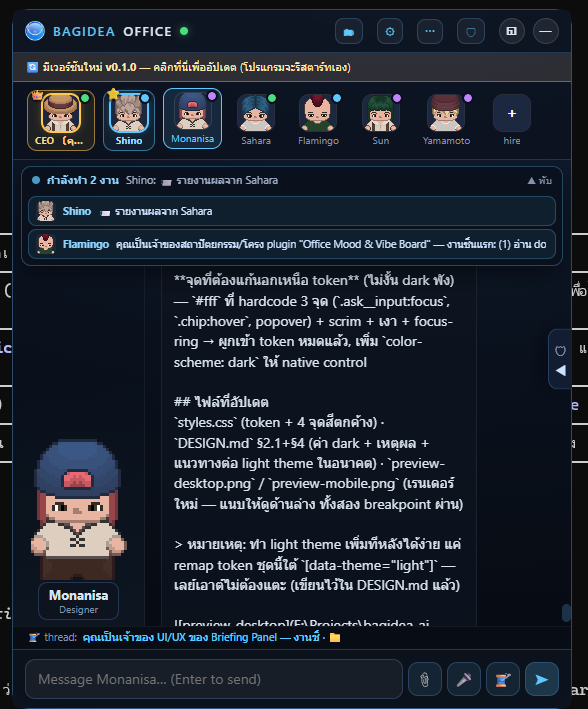
The chat panel opens on your CEO seat. Type an order in the CEO seat and the Director walks over to take it, plans, and delegates — you watch the hand-offs on the wallpaper, and the summary is walked back to you. To talk to any agent directly, click their face in the rail or on the live map. Every conversation is a resumable thread with full history.
Projects
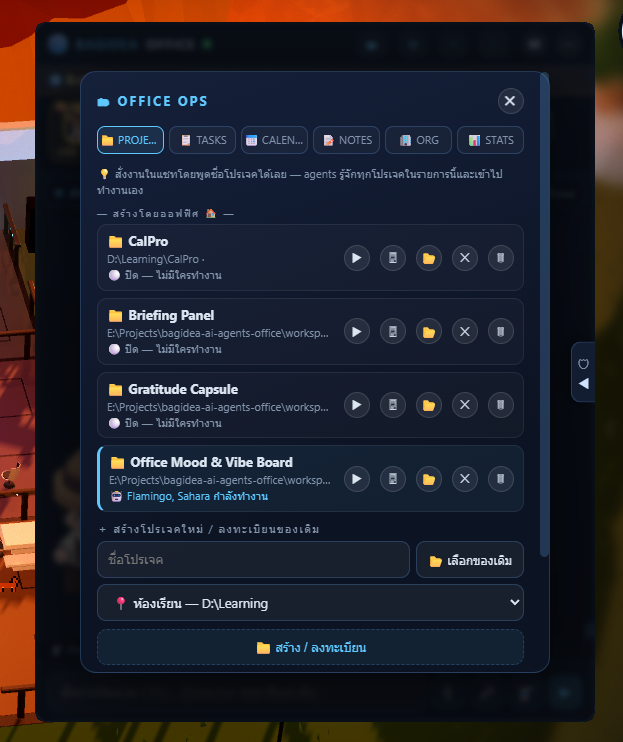
Register real folders as projects (with PLACE shorthands like "classroom → D:\Learning"). The Director can create new projects himself and route work into them; the assignee's Claude session runs inside that directory and is resumable. One occupant at a time: while an agent works a project you can't open it (a ⏹ stop-agent button with a two-click confirm lets you take over), and while you have it open an agent won't enter.
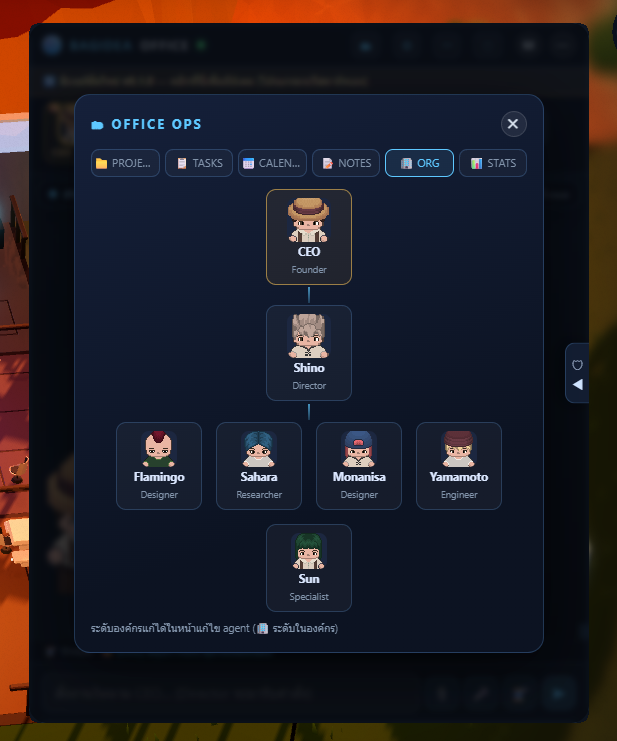
The whole roster arranges itself into an org chart (🗂 → ORG): CEO → Director → mid → staff. Hire from ⚙ → AGENTS: name, role, avatar + aura, tier, a Persona Copilot that fills the prompt and picks fitting skills + tools, one of 16 voices, and the exact tools each agent may run.
Permissions
Tools you grant in an agent's profile run silently — and the agent never even leaves its desk. For anything else, the agent walks to the Security Center and waits while a card pops up with the exact command. Choose Allow, ✓✓ Forever (remembers the grant), or Deny. No answer in 50 seconds auto-denies and the agent re-plans.
A project can also carry its own .claude hooks — commands that run the moment a session opens in that folder, before the model acts. So registering a folder is not consent to run the code it ships: a project with its own hooks raises a card listing the literal commands, and the work is parked until you answer. Approval is bound to that exact setup, so editing the settings file or the script a hook calls asks again. From the terminal: bagidea trust.
Keep going without you (AUTO)
By default, an agent that reaches a fork stops to ask your opinion and the job waits until you answer. Turn AUTO on (⚙ → TOOLS, or bagidea auto on) and it decides for itself and opens its own next turn until the work is genuinely finished — at most 8 self-driven rounds per job, each announced in chat. It still stops for a credential it cannot get, or an action that cannot be undone (push, deploy, delete, spend), and that block is pushed to your channels. Scheduled jobs run as real orders too. AUTO removes the wait for an opinion; what an agent may do is still the separate 🔓 auto-approve switch.
Where agents run
By default every agent runs on the machine the office is on. ⚙ → TOOLS → 📦 RUN LOCATION points the whole office — or one agent — somewhere else: a throwaway Docker container, or another machine over SSH. A container gets exactly two mounts, the office root at /office read-only and the working directory at /work, and API keys are passed by name, so the values travel in Docker’s own environment and never appear in a process listing. The image must have the claude CLI on its PATH — the office does not install it for you. And a backend that cannot be built correctly is refused, not quietly downgraded, above all when the settings file that installs the permission broker cannot be placed: a run that loses it works fine with nobody watching.
Ghosts that don’t overwrite each other
Ghost clones have always shared one directory, and two of them editing one file is not a race careful prompting wins. ⚙ → TOOLS → 👻 GHOST ISOLATION gives each ghost its own git worktree on a project that is a git repository: both succeed, their work comes back as office/ghost-<id> branches for you to review, a ghost that changed nothing leaves no directory and no branch, and your working copy is never touched — not even to stash. It is off by default, because turning it on moves where a ghost’s edits land.
Recall by meaning, not only by words
What decides which memory a session sees is a search over everything the office knows, and that search matches words — BM25, no dependencies, offline. It is fast and often enough, and it has one blind spot: ask “why did the wallpaper vanish” and a note reading “WorkerW teardown kills the embedded world” shares no meaningful token with the question, so however good that note is, it does not come back. ⚙ → SKILLS → 🔎 SEMANTIC RECALL points the office at any OpenAI-shaped /embeddings endpoint — a local Ollama is the recommended setup, because it costs nothing and your memory never leaves the machine — and fuses the two rankings so words and meaning each get a say. It is off until you turn it on, saving tests the endpoint and reports the vector size, and if the endpoint later goes down recall quietly returns to matching words rather than failing.
The 3D Editor
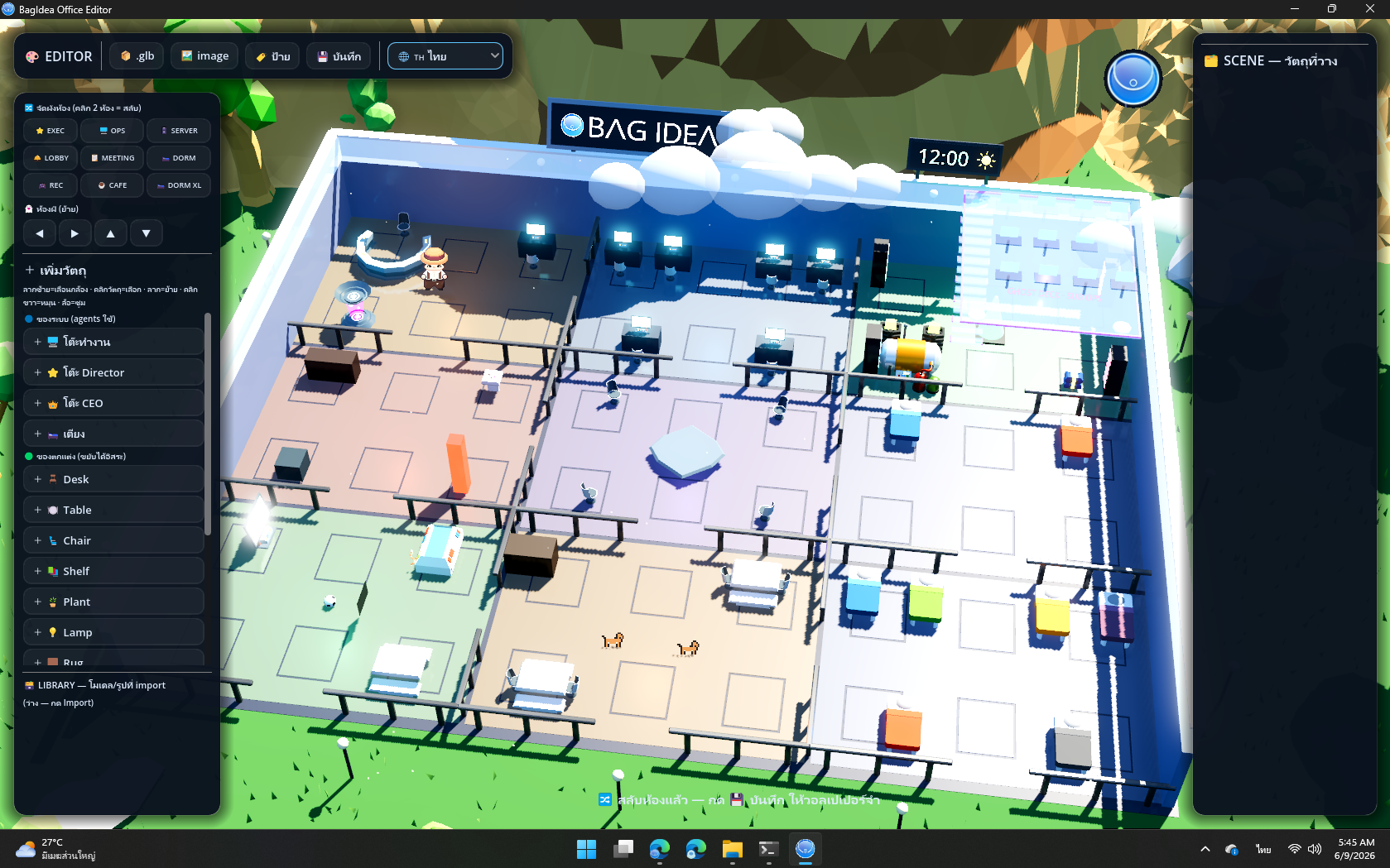
Open the editor (the 🎨 button or bagidea editor) to rearrange the office in true 3D: click two rooms to swap them on the 3×3 grid, move the Ghost Deck, place furniture and decor, and import your own .glb/.gltf/.fbx models and images. Save and the wallpaper updates instantly — furniture, agent seats, navigation and pets all follow.
Voice & channels
Hold Right Ctrl anywhere to speak a command to the office. Give agents one of 16 TTS voices (split clearly ♀/♂). Call the main agent for a realtime voice conversation (Gemini Live) in its assigned voice. Connect Telegram, Discord, LINE, Slack, Feishu/Lark, WhatsApp or Messenger and command your office from your phone — replies come back on the same channel.
Updates & start-up
A VERSION file marks real releases: the office only shows the 🔄 update banner when main's version is newer than yours, so routine commits never nag you. Click the banner or run bagidea update to pull, rebuild and relaunch (your data is kept). Set it to launch with Windows from the tray, settings, or bagidea startup on.
Swappable brains (any model)
Run each agent on its own model. Claude Code stays the engine — only the brain behind it swaps, and it fails open to Claude, so nothing changes until you opt an agent in. No LiteLLM or Python to install — a translation proxy is built into the daemon.
- Direct (Anthropic-compatible): Claude · GLM (Z.AI) · DeepSeek · Qwen (Alibaba) · MiniMax · Kimi (Moonshot) · Kimi Code
- Via the built-in proxy (OpenAI-compatible): OpenAI · Gemini · OpenRouter · NVIDIA · Groq · Cerebras · xAI (Grok) · Mistral · Together · Fireworks — plus local Ollama / LM Studio with no API key. Pickers fetch each provider's live model list.
- Custom providers: add your own — name + Base URL + key, Anthropic- or OpenAI-style (point it at a LiteLLM gateway if you run one).
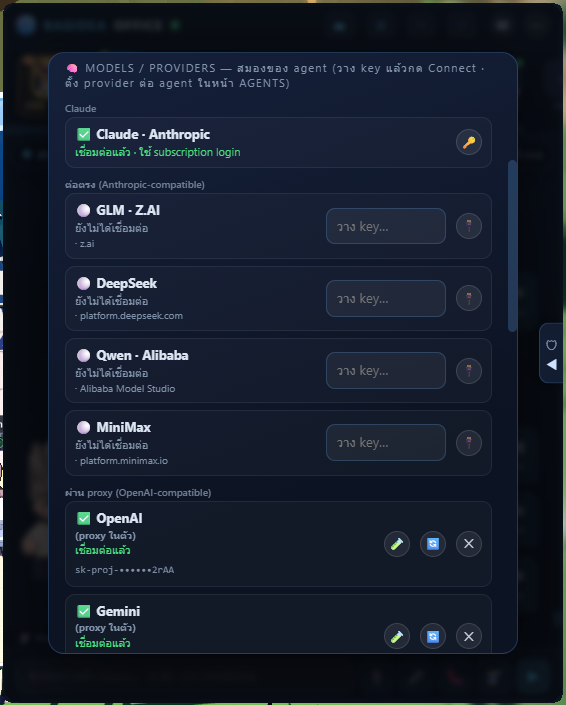
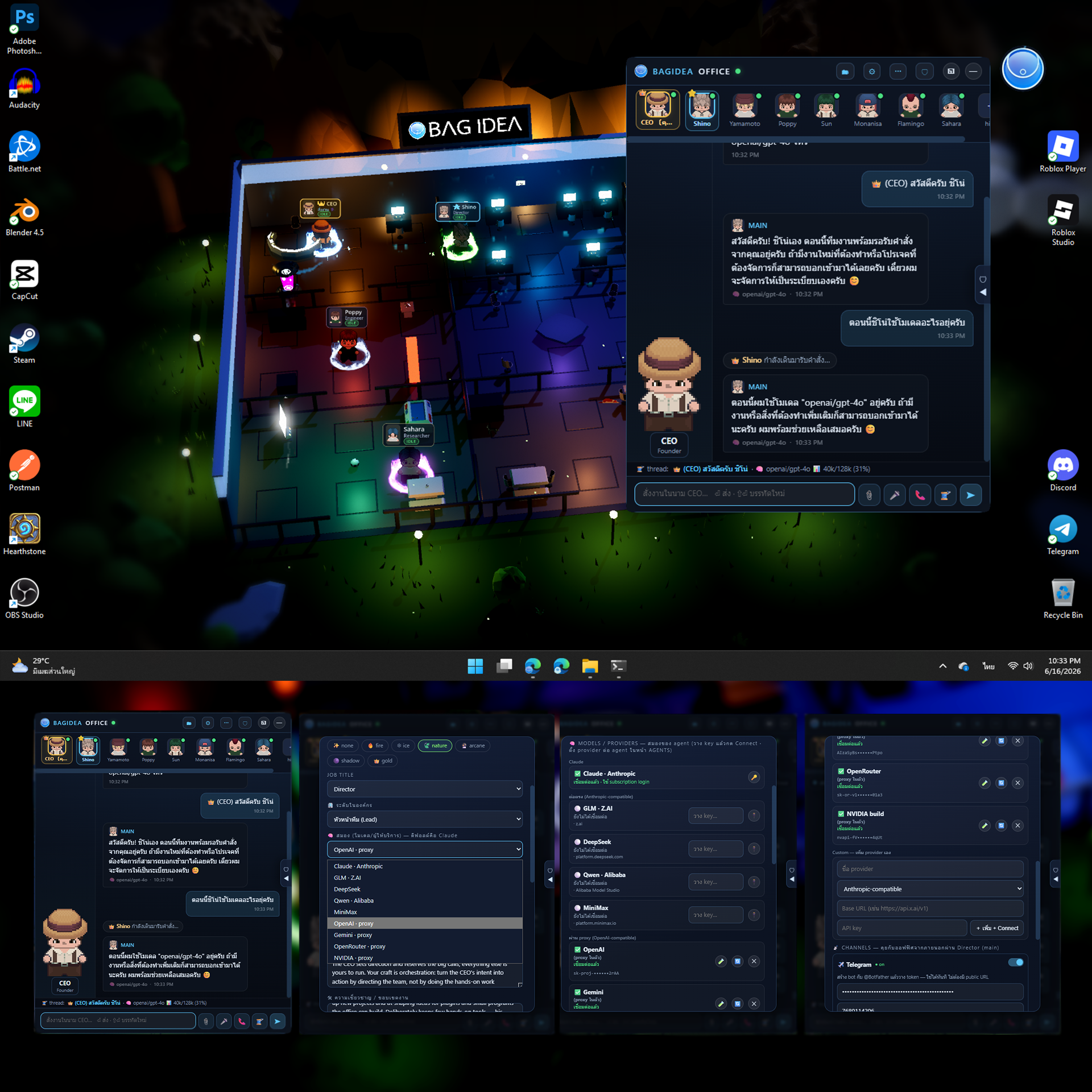
Set it up: ⚙ CONNECT → 🧠 MODELS/PROVIDERS → paste a key → Connect (✅). Then ✏️ edit an agent → 🧠 Brain → pick provider + model (a working default is auto-selected) → Save.
Free to try, with limits: NVIDIA build is free but rate-limited (~40 req/min); OpenRouter has free :free models that are daily-capped (use vendor/model ids); Gemini has a generous free quota; OpenAI Tier 1 (30k tokens/min) is small for heavy agent work.
Auto-compact + auto-new-thread — for every model. Long chats never clog: before each turn the office measures the thread against the model's context window and, if it's filling up, summarizes it with Claude and continues on a fresh thread — recovering the same way if a backend rejects a too-big request. Continuity is preserved (the summary is Claude-written) and the view follows you to the new thread.
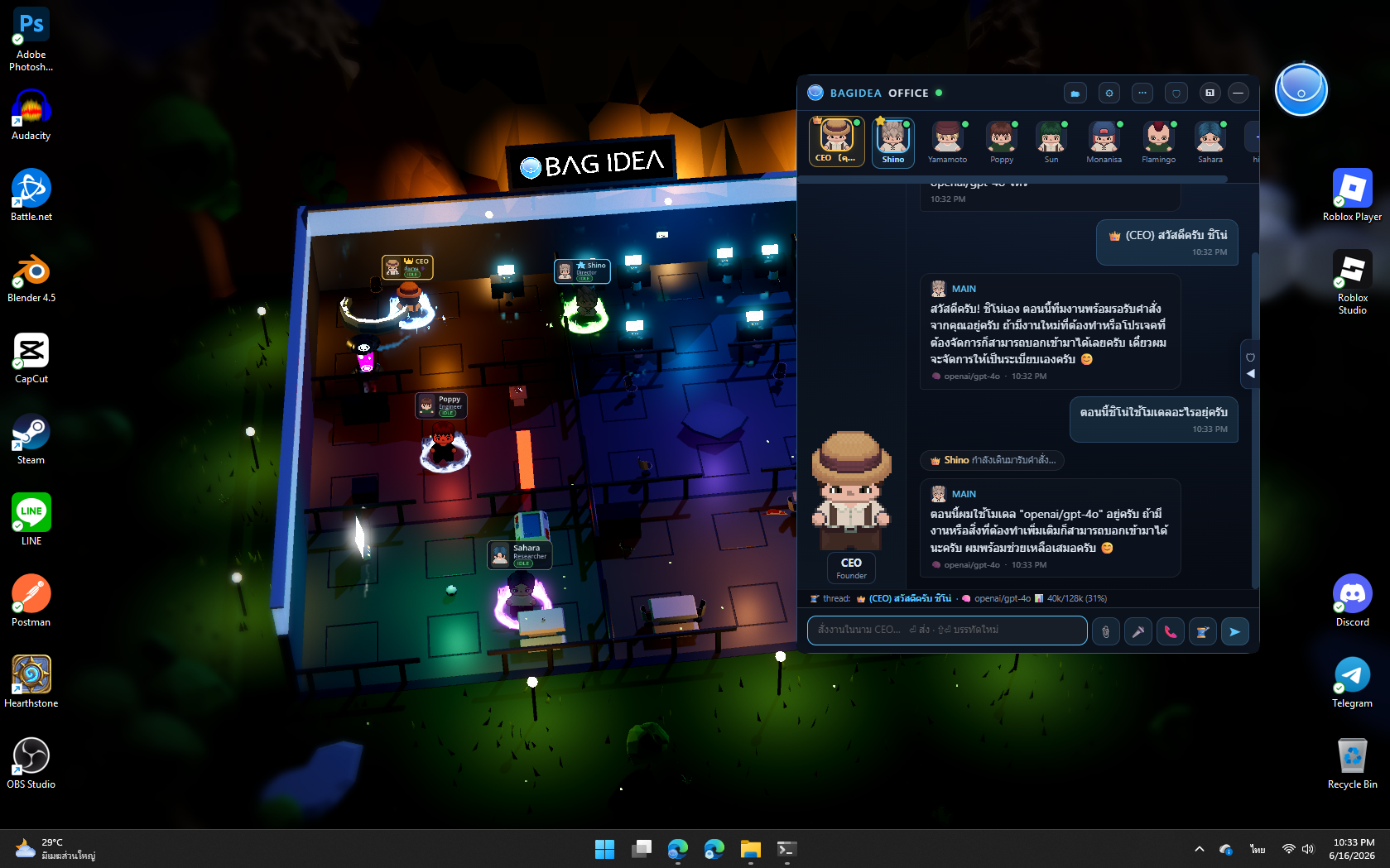
Monitor it: every message is tagged with its model, the thread bar shows a live context meter (e.g. gpt-4o · 40k/128k), the 🧠 BRAINS panel tracks every provider + agent, and STATS estimates per-provider spend.
Plugins, skills & tools
Plugins extend the office for real — a folder with a manifest can add UI panels, HTTP routes, and commands agents can drive, with ctx access to the registry, feed, broadcasting and even running Claude turns. Two core plugins ship in the box (🎵 Music Player, 🧮 Calculator); install more from any GitHub repo. Start from the official template, or read the worked example repos.
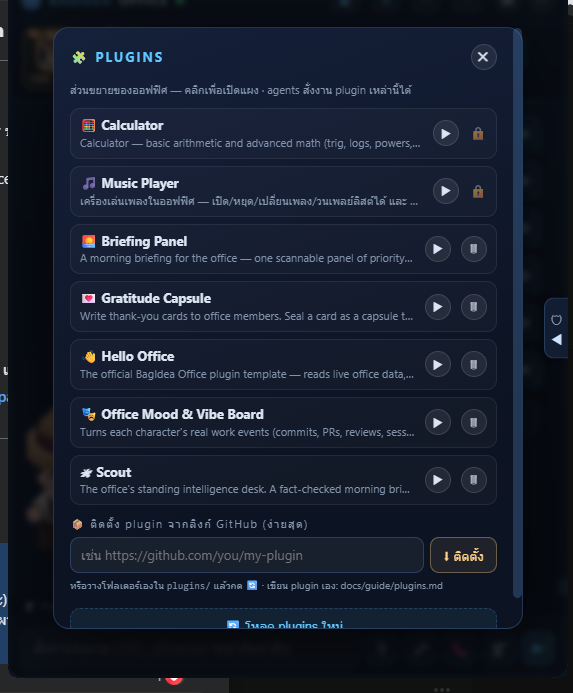
bagidea plugin install https://github.com/bagidea/bagidea-office-templateEvery office ships with 15 builtin skill packs — deep research, web automation, office control, office operations, plugin building, code review, doc writing, debugging, data wrangling, project kickoff, diagram making, archive recall, workflow building, a file & media toolkit (read/convert PDF·Excel·Word·PowerPoint, build slide decks, transcribe video, edit images), and office-scheduled jobs — that you can assign to any agent, plus Hermes-style skills the office learns automatically after real work. Add new raw capability via MCP servers.
Skills that correct themselves
After a real multi-tool task, a reflection pass decides whether the work distills into a reusable skill. Since v1.0.0 the same pass can also correct a skill it wrote earlier, and it runs after failures too — the strongest evidence a skill is wrong, and previously the one case that was thrown away. It never touches a built-in and never touches a skill you edited by hand, and the previous version is kept, so a correction can be undone.
The Tools Hub
⋯ → 🧰 Tools Hub is a browsable catalog of 43 entries: the 15 abilities every agent already has, and 28 MCP servers you can add with one click — browser automation, GitHub, Notion, Slack, Postgres, and a creative shelf with Blender, Godot, Unity, Unreal Engine and Roblox Studio. Every card carries a plain-language risk line, because a search server and a database server are not the same question, and adding a server to the office stays a separate step from granting it to an agent. The catalog is a file the office fetches live, so a renamed package is a pull request rather than a release.
Media Studio
⋯ → Media Studio opens the office’s media room: make a picture, change one, then make it move — in one window, because the work is iterative. An edit never overwrites its input; you always get a new file and the result becomes the selection, so a second instruction refines the first rather than starting over. Everything lands in workspace/uploads, so it shows in chat straight away. Agents can make and change pictures; only you can make video, because a clip costs around $2 and the button says the price next to it.
Workflow Builder
Plan work as plain-language nodes on a drag-drop canvas (⋯ menu → Workflow Builder) — each node is a step (trigger / fetch / action / decision / output) and the flow reads top to bottom. Press Analyze and the Director reads your plan and tells you which skills and tools it needs, what permissions or extra agents to add, and what's still undecided — so you can plan work even if you don't know how to instruct it, and let the team work out the execution.
- Add nodes & write in plain language. e.g. “every morning summarize AI news, then send it to Telegram”. Drag cards to order the flow top→bottom.
- Analyze. The Director returns a plan: needed skills/tools, permissions/agents to set up, and open questions. (This release plans only — it doesn't auto-run yet.)
- Save & reuse. Workflows are stored under workspace/workflows. Three example workflows ship in the box to learn from.
Languages
The whole interface supports 14 languages. English is the default; pick another in settings and the office translates office-wide (and remembers your choice per machine). This website speaks the same 14 languages — use the picker in the top bar.
en ไทย 中文 Español हिन्दी العربية Português Русский 日本語 Deutsch Français 한국어 Indonesia Tiếng Việt
Sponsoring
BagIdea Office is free and open source; sponsorship funds development, art licenses and cross-platform backends. It is a recurring monthly subscription run entirely by GitHub Sponsors (like a YouTube or Patreon membership) — secure payments, tax and payouts are GitHub's job, not ours. Four monthly tiers: 💛 Supporter ($5), 🥉 Bronze / Backer ($30), 🥈 Silver Partner ($300), 👑 Gold Partner ($3,000).
- Choose a tier & sponsor. Use the “💖 Sponsor on GitHub” button on the site (or github.com/sponsors/bagidea), pick a monthly tier, and confirm — GitHub charges you each month until you cancel.
- Your logo & link come from your GitHub profile — automatically. Your avatar, display name and link are pulled straight from your GitHub account; there is nothing to send us. To control the link, set the Website field in your GitHub profile (Settings → Public profile). Sponsoring as a GitHub Organization shows your company logo and site.
- You appear within ~6 hours. As long as you choose “Make my sponsorship public” at checkout, an automated workflow pulls the live list, maps each sponsor to a tier by amount, and updates the supporters wall on the website and the README — sorted by tier, amounts never shown. Private sponsors are respected and not listed.
Everyone joins through GitHub Sponsors. The only exceptions are featured partners added by hand (e.g. WARRIX, pinned first); Reuannamphung is shown as a courtesy until they move to GitHub Sponsors.
CLI reference
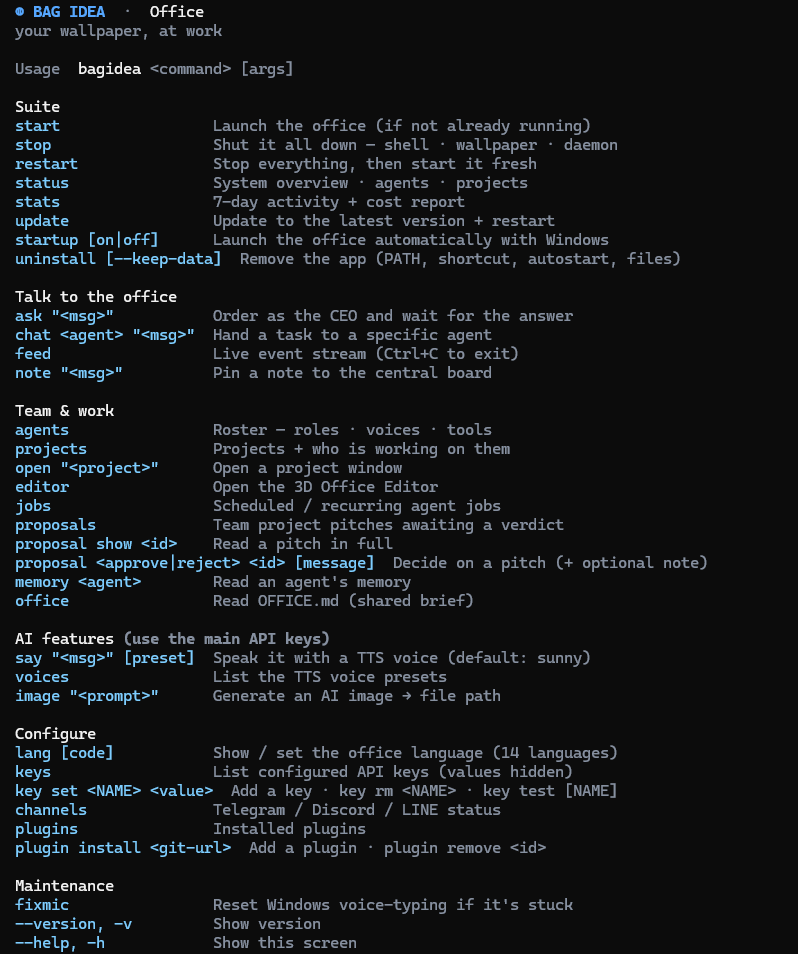
The installer puts bagidea on your PATH. It talks to the running office and can start it. A few highlights:
| Command | Does |
|---|---|
bagidea start | stop | restart | Launch / stop / restart the whole suite |
bagidea status | Health + agents + projects + who's working |
bagidea stats | Dashboard: runs / cost / busiest / uptime |
bagidea ask "<message>" | Order the Director and wait for the final answer |
bagidea chat <agent> "<msg>" | Hand a task to a specific agent (fire-and-forget) |
bagidea agents · projects | List staff / projects with live status |
bagidea open "<project>" | Open a project window (same as ▶) |
bagidea proposals | Team project pitches awaiting a verdict |
bagidea proposal show <id> | Read a pitch in full |
bagidea proposal approve|reject <id> [note] | Decide on a pitch (+ optional note to the team) |
bagidea plugins | List installed plugins |
bagidea plugin install <git-url> · remove <id> | Add / remove a plugin |
bagidea lang <code> | Show / set the office language (14 languages) |
bagidea say "<text>" · voices | Speak via TTS · list voice presets |
bagidea image "<prompt>" | Generate an AI image into the office |
bagidea channels · keys | Channel + API-key status |
bagidea feed | Live office event stream in your terminal |
bagidea editor | Open the 3D Office Editor |
bagidea auto [on|off] | 🤖 Keep-going mode — the team decides and finishes without waiting on you |
bagidea trust [allow|deny] "<project>" | 🛡 Projects whose own .claude hooks are waiting on your word |
bagidea eco [on|off] | 🌱 Eco mode — cut idle token burn (rhythms stretch, QA pass off) |
bagidea export [file] | Pack agents · skills · memory · plugins into one .tgz |
bagidea import <file> | Restore an exported office on this machine |
bagidea startup [on|off] | Launch the office with Windows (show / set) |
bagidea update · version | Update to the latest release · show current version |
bagidea --help · --version | Full command list / current build |
Move to a new machine
Moving to a new machine? bagidea export packs your whole office — agents, skills, memory, projects, plugins — into one file. Install BagIdea Office on the new machine and run bagidea import to bring the same team back.
FAQ
Does it cost money to run?
The app is free and open source (MIT). Agents run through your own Claude Code login, so usage follows your existing Claude account or subscription — there is no separate BagIdea fee.
Is my code/data sent anywhere?
The daemon runs locally on 127.0.0.1. Agents are Claude Code sessions, so they use Claude like any Claude Code project. Optional features (voice, image, realtime) use your own OpenAI/Gemini keys only when you enable them.
Which platforms are supported?
Windows 11, macOS 13+ (beta), and Linux (experimental) today.
Can I build my own plugin?
Yes — fork the official template repo. A person or an agent can build a working plugin from it in minutes; the full spec is in the plugin guide.